> ## Documentation Index
> Fetch the complete documentation index at: https://dev.chief.bot/llms.txt
> Use this file to discover all available pages before exploring further.
# CLI overview
> Install and configure the chief command-line client.
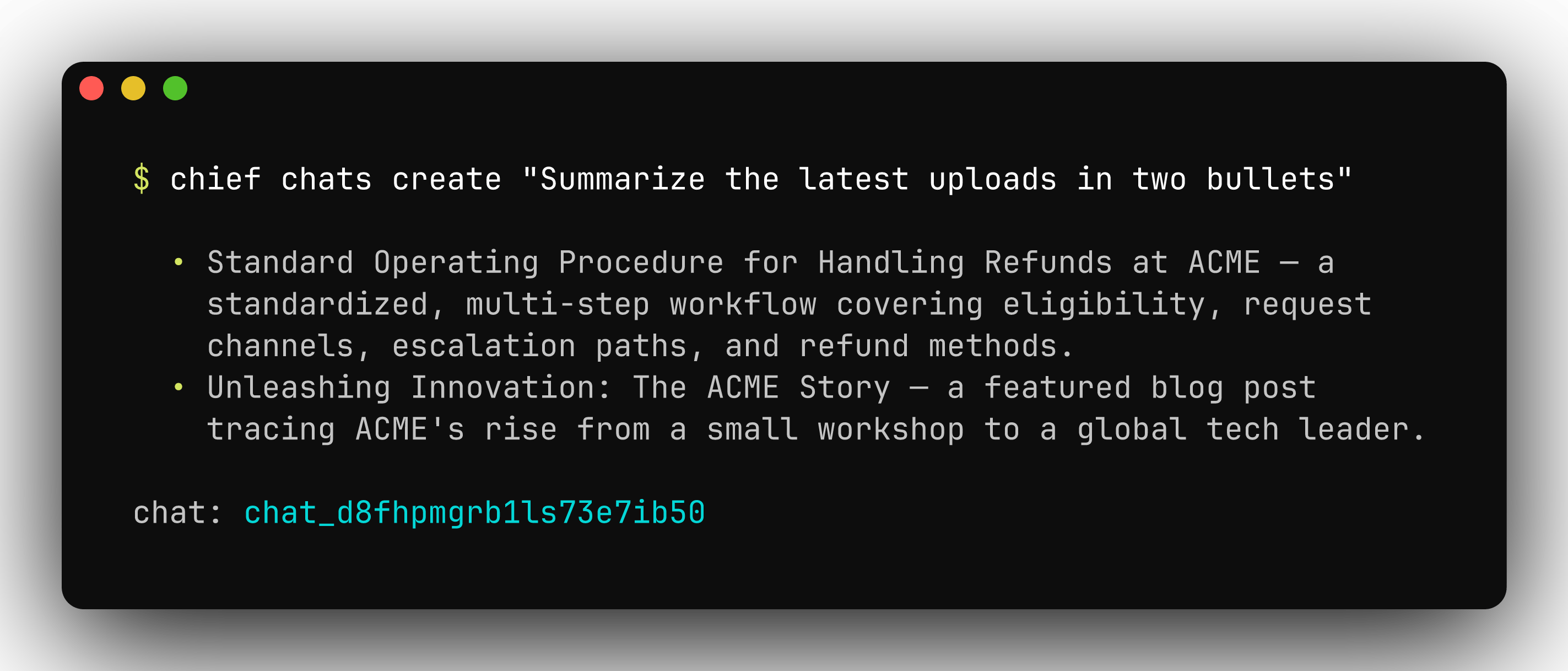
The `chief` CLI puts your whole Chief project in your terminal. Ask a question and
read the answer rendered in place, upload a folder of documents, schedule an
automation, or pull raw JSON into a script — without writing any API code.
It renders styled output at a prompt and switches to machine-readable JSON when piped
or run with `--json`, so the same command works at a prompt, in a script, in CI, and
behind an AI coding agent. New to it? The [quickstart](#quickstart) below gets you from
install to your first answer in three commands.
 ## Install
[Homebrew](https://brew.sh) is the recommended install on macOS:
```bash Homebrew theme={null}
brew install --cask Storytell-ai/tap/chief
```
```bash Go theme={null}
go install github.com/Storytell-ai/chief-cli/cmd/chief@latest
```
```bash From source theme={null}
git clone https://github.com/Storytell-ai/chief-cli.git
cd chief-cli
go build -o bin/chief ./cmd/chief
```
The Go and source options require a [Go toolchain](https://go.dev/doc/install).
`go install` puts a `chief` binary in `$(go env GOPATH)/bin` — make sure that
directory is on your `PATH`. Prebuilt binaries for Linux, macOS, and Windows
(`amd64` and `arm64`) are on the
[releases page](https://github.com/Storytell-ai/chief-cli/releases).
Verify the install:
```bash theme={null}
chief --version
```
### Update
```bash Homebrew theme={null}
brew upgrade --cask Storytell-ai/tap/chief
```
```bash Go theme={null}
go install github.com/Storytell-ai/chief-cli/cmd/chief@latest
```
For a prebuilt binary, download the newer archive and replace the binary on your
`PATH`.
## Quickstart
```bash theme={null}
# 1. Authenticate (prompts for base URL, API key, and project).
chief login
# 2. Confirm everything resolves and the API is reachable.
chief doctor
# 3. Ask a question.
chief chats create "What changed in my project this week?"
```
`chief login` asks for your API key and project id. Create a token in the Chief
app under [**Settings → API tokens**](https://chief.bot/settings/tokens) — see
[Introduction](/api-reference/introduction) for where to find both.
Already have an API key and project id? Skip the prompts:
```bash theme={null}
chief login --api-key "$CHIEF_API_KEY" --project project_d8a4td4dib27i4beefb0
```
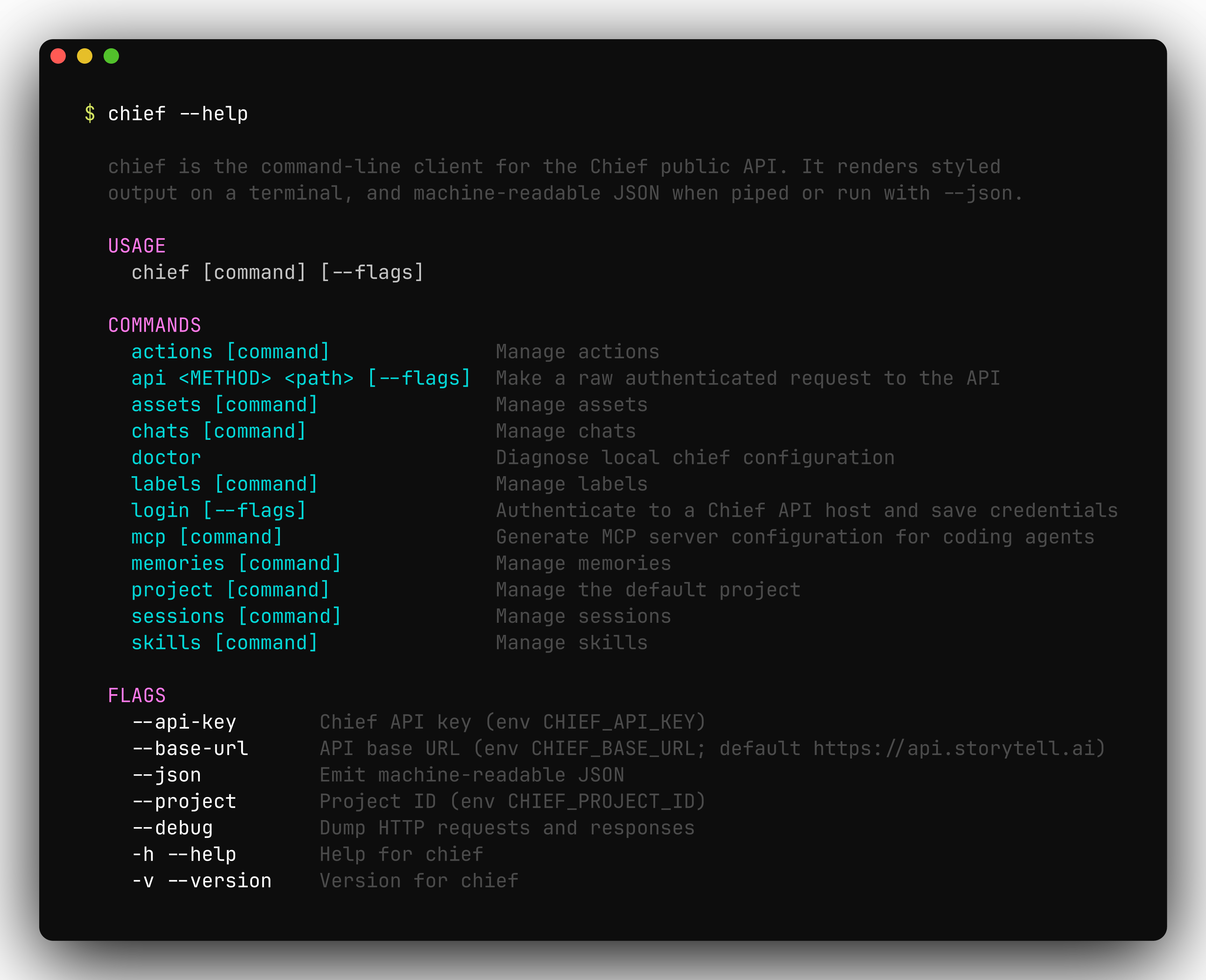
Run `chief --help` at any time to see every command — each maps to a Chief API
resource:
## Install
[Homebrew](https://brew.sh) is the recommended install on macOS:
```bash Homebrew theme={null}
brew install --cask Storytell-ai/tap/chief
```
```bash Go theme={null}
go install github.com/Storytell-ai/chief-cli/cmd/chief@latest
```
```bash From source theme={null}
git clone https://github.com/Storytell-ai/chief-cli.git
cd chief-cli
go build -o bin/chief ./cmd/chief
```
The Go and source options require a [Go toolchain](https://go.dev/doc/install).
`go install` puts a `chief` binary in `$(go env GOPATH)/bin` — make sure that
directory is on your `PATH`. Prebuilt binaries for Linux, macOS, and Windows
(`amd64` and `arm64`) are on the
[releases page](https://github.com/Storytell-ai/chief-cli/releases).
Verify the install:
```bash theme={null}
chief --version
```
### Update
```bash Homebrew theme={null}
brew upgrade --cask Storytell-ai/tap/chief
```
```bash Go theme={null}
go install github.com/Storytell-ai/chief-cli/cmd/chief@latest
```
For a prebuilt binary, download the newer archive and replace the binary on your
`PATH`.
## Quickstart
```bash theme={null}
# 1. Authenticate (prompts for base URL, API key, and project).
chief login
# 2. Confirm everything resolves and the API is reachable.
chief doctor
# 3. Ask a question.
chief chats create "What changed in my project this week?"
```
`chief login` asks for your API key and project id. Create a token in the Chief
app under [**Settings → API tokens**](https://chief.bot/settings/tokens) — see
[Introduction](/api-reference/introduction) for where to find both.
Already have an API key and project id? Skip the prompts:
```bash theme={null}
chief login --api-key "$CHIEF_API_KEY" --project project_d8a4td4dib27i4beefb0
```
Run `chief --help` at any time to see every command — each maps to a Chief API
resource:
 ## Authentication & configuration
`chief` authenticates with a Chief API key (a Personal Access Token) scoped to a
project. Settings resolve with the precedence **flag > environment variable >
saved credentials > built-in default**, evaluated independently for each value.
| Setting | Flag | Environment variable | Default |
| -------- | ------------ | -------------------- | -------------------------- |
| API key | `--api-key` | `CHIEF_API_KEY` | — |
| Project | `--project` | `CHIEF_PROJECT_ID` | — |
| Base URL | `--base-url` | `CHIEF_BASE_URL` | `https://api.storytell.ai` |
`chief login` verifies the key against the API and writes it to a credentials
file at `$XDG_CONFIG_HOME/chief/credentials.json` (or
`~/.config/chief/credentials.json` when `XDG_CONFIG_HOME` is unset). The file
holds a secret, so it is created with `0600` permissions inside a `0700`
directory.
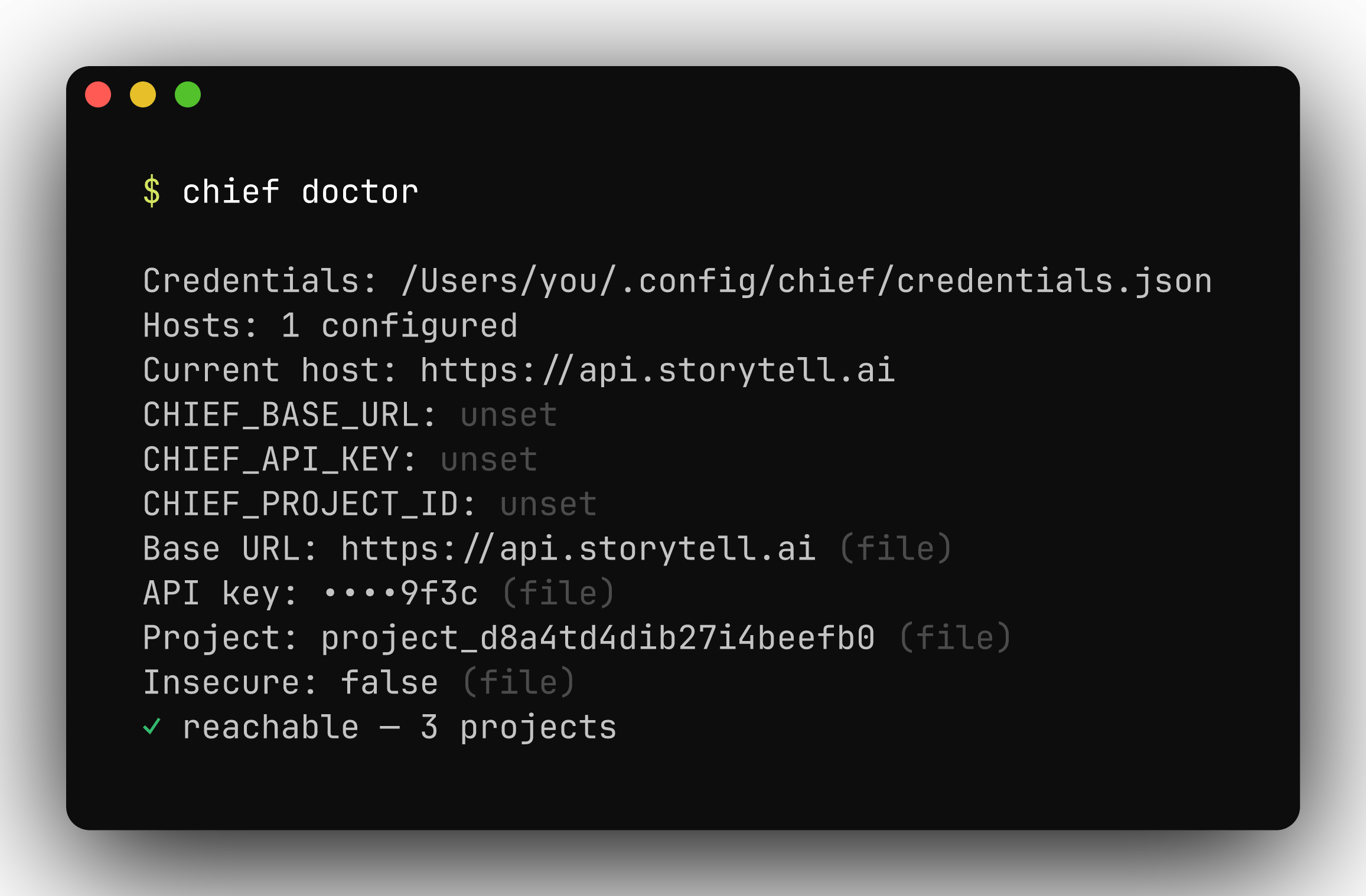
`chief doctor` reports where each effective setting came from, whether the
credentials file is parseable and correctly permissioned, and whether the API is
reachable:
## Authentication & configuration
`chief` authenticates with a Chief API key (a Personal Access Token) scoped to a
project. Settings resolve with the precedence **flag > environment variable >
saved credentials > built-in default**, evaluated independently for each value.
| Setting | Flag | Environment variable | Default |
| -------- | ------------ | -------------------- | -------------------------- |
| API key | `--api-key` | `CHIEF_API_KEY` | — |
| Project | `--project` | `CHIEF_PROJECT_ID` | — |
| Base URL | `--base-url` | `CHIEF_BASE_URL` | `https://api.storytell.ai` |
`chief login` verifies the key against the API and writes it to a credentials
file at `$XDG_CONFIG_HOME/chief/credentials.json` (or
`~/.config/chief/credentials.json` when `XDG_CONFIG_HOME` is unset). The file
holds a secret, so it is created with `0600` permissions inside a `0700`
directory.
`chief doctor` reports where each effective setting came from, whether the
credentials file is parseable and correctly permissioned, and whether the API is
reachable:
 ## Shell completion
`chief` ships completions for bash, zsh, fish, and PowerShell. Generate a script
with `chief completion ` and load it from your shell profile — for zsh:
```bash theme={null}
chief completion zsh > "${fpath[1]}/_chief"
```
Run `chief completion --help` for the per-shell install steps.
## Output & scripting
Every command renders styled, human-readable output on a terminal and switches
to JSON when you add `--json` or pipe the output. JSON is pretty-printed on a
TTY and compact when piped, so it composes cleanly with tools like
[`jq`](https://jqlang.github.io/jq/).
```bash theme={null}
# Pretty table on a terminal.
chief assets list
# Stable JSON for scripts.
chief assets list --json | jq -r '.data[] | select(.status=="failed") | .asset_id'
# Capture the new chat's id without waiting for the answer.
chief chats create "Kick off analysis" --no-wait --json | jq -r '.chat_id'
```
Commands exit `0` on success and non-zero on failure. Delete commands prompt for
confirmation on an interactive terminal; pass `--force` (or `-f`) to skip the
prompt, which is also the default when output is piped or `--json` is set. Set
`ACCESSIBLE=1` to degrade interactive prompts to plain text for screen readers.
## Continuous integration
`chief` runs unattended in CI. Pass credentials as environment variables rather
than flags — flags can leak into process listings and build logs:
```bash theme={null}
export CHIEF_API_KEY="$CHIEF_API_KEY" # from your CI secret store
export CHIEF_PROJECT_ID="project_d8a4td4dib27i4beefb0"
chief assets upload ./docs --json
```
* Output is non-interactive automatically when piped or `--json` is set:
confirmation prompts are skipped and JSON is emitted compact.
* A non-zero exit on any command fails the step, so failures surface in the job.
* Override `CHIEF_BASE_URL` to run the same commands against a different API base
URL.
## Raw API access
`chief api` sends an authenticated request to any endpoint and prints the JSON
response. Authentication and content-type headers are applied for you — useful
for endpoints the CLI doesn't yet wrap, or for debugging.
```bash theme={null}
chief api GET /v1/projects
chief api POST /v1/labels --body '{"name":"Urgent","color":"#e24b4a"}'
chief api POST /v1/labels --body @label.json # read the body from a file
```
Add `--debug` to any command to dump the full HTTP request and response.
## Global flags
These persistent flags apply to every command:
| Flag | Description |
| ------------ | ----------------------------------------------------------------------- |
| `--api-key` | Chief API key (env `CHIEF_API_KEY`) |
| `--project` | Project id (env `CHIEF_PROJECT_ID`) |
| `--base-url` | API base URL (env `CHIEF_BASE_URL`; default `https://api.storytell.ai`) |
| `--insecure` | Skip TLS certificate verification (local dev only) |
| `--json` | Emit machine-readable JSON |
| `--debug` | Dump HTTP requests and responses |
| `--no-color` | Disable colored output |
## Next steps
* [Command reference](/tools/cli/commands) — every command, grouped by resource
* [MCP server](/mcp/overview) — generate client config with `chief mcp config`
## Shell completion
`chief` ships completions for bash, zsh, fish, and PowerShell. Generate a script
with `chief completion ` and load it from your shell profile — for zsh:
```bash theme={null}
chief completion zsh > "${fpath[1]}/_chief"
```
Run `chief completion --help` for the per-shell install steps.
## Output & scripting
Every command renders styled, human-readable output on a terminal and switches
to JSON when you add `--json` or pipe the output. JSON is pretty-printed on a
TTY and compact when piped, so it composes cleanly with tools like
[`jq`](https://jqlang.github.io/jq/).
```bash theme={null}
# Pretty table on a terminal.
chief assets list
# Stable JSON for scripts.
chief assets list --json | jq -r '.data[] | select(.status=="failed") | .asset_id'
# Capture the new chat's id without waiting for the answer.
chief chats create "Kick off analysis" --no-wait --json | jq -r '.chat_id'
```
Commands exit `0` on success and non-zero on failure. Delete commands prompt for
confirmation on an interactive terminal; pass `--force` (or `-f`) to skip the
prompt, which is also the default when output is piped or `--json` is set. Set
`ACCESSIBLE=1` to degrade interactive prompts to plain text for screen readers.
## Continuous integration
`chief` runs unattended in CI. Pass credentials as environment variables rather
than flags — flags can leak into process listings and build logs:
```bash theme={null}
export CHIEF_API_KEY="$CHIEF_API_KEY" # from your CI secret store
export CHIEF_PROJECT_ID="project_d8a4td4dib27i4beefb0"
chief assets upload ./docs --json
```
* Output is non-interactive automatically when piped or `--json` is set:
confirmation prompts are skipped and JSON is emitted compact.
* A non-zero exit on any command fails the step, so failures surface in the job.
* Override `CHIEF_BASE_URL` to run the same commands against a different API base
URL.
## Raw API access
`chief api` sends an authenticated request to any endpoint and prints the JSON
response. Authentication and content-type headers are applied for you — useful
for endpoints the CLI doesn't yet wrap, or for debugging.
```bash theme={null}
chief api GET /v1/projects
chief api POST /v1/labels --body '{"name":"Urgent","color":"#e24b4a"}'
chief api POST /v1/labels --body @label.json # read the body from a file
```
Add `--debug` to any command to dump the full HTTP request and response.
## Global flags
These persistent flags apply to every command:
| Flag | Description |
| ------------ | ----------------------------------------------------------------------- |
| `--api-key` | Chief API key (env `CHIEF_API_KEY`) |
| `--project` | Project id (env `CHIEF_PROJECT_ID`) |
| `--base-url` | API base URL (env `CHIEF_BASE_URL`; default `https://api.storytell.ai`) |
| `--insecure` | Skip TLS certificate verification (local dev only) |
| `--json` | Emit machine-readable JSON |
| `--debug` | Dump HTTP requests and responses |
| `--no-color` | Disable colored output |
## Next steps
* [Command reference](/tools/cli/commands) — every command, grouped by resource
* [MCP server](/mcp/overview) — generate client config with `chief mcp config`