

response field is present.
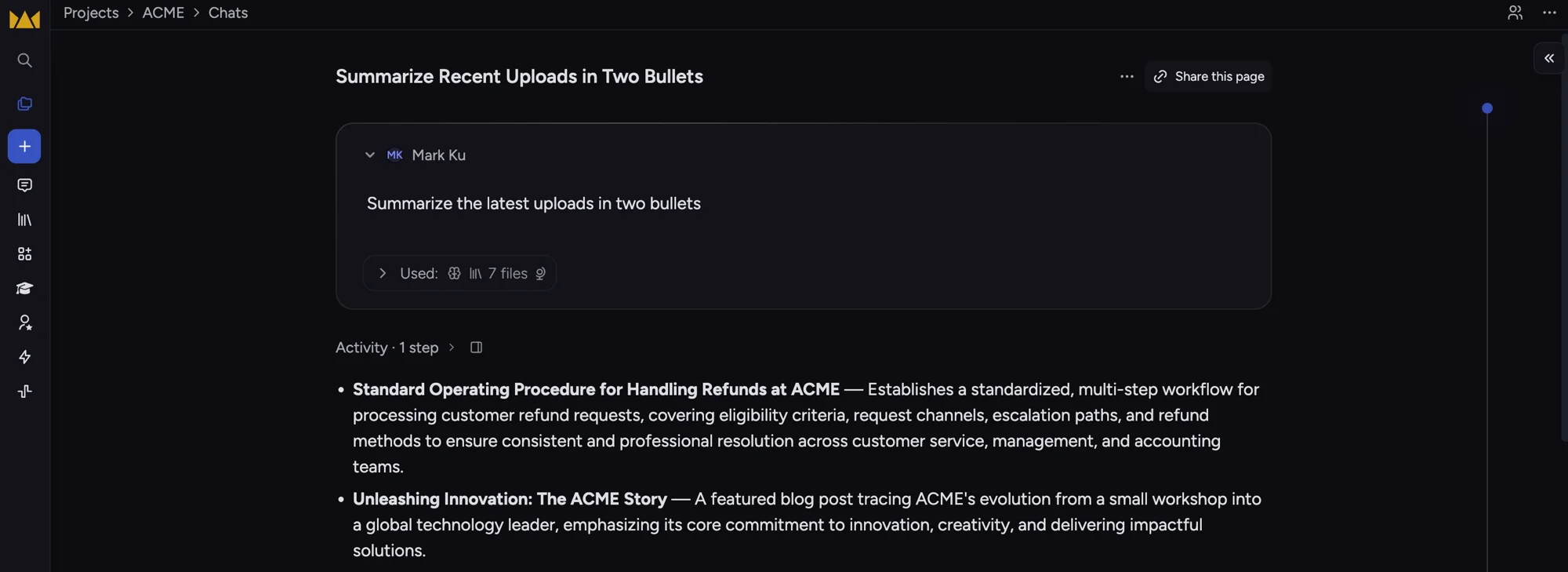
A completed chat in Chief — the assistant's answer, grounded in the project's files.
Lifecycle overview
There is no lifecycle enum on messages in v1. Treat the appearance ofresponse as completion.
Start a new chat
POST /v1/chats accepts a CreateChatRequest body:
prompt(required) — user message that starts the threadintelligence—auto(default),fast,expert, orresearchprovider—automatic,anthropic,openai, orgoogleskills— array of skill names to preloadpublic_data— setfalseto disable public web search for this turnscope— optional knowledge scope (assets, chats, labels, concepts, projects, views)
202):
GET /v1/chats/{chat_id}/messages/{message_id}.
Append a turn
POST /v1/chats/{id}/messages uses the same optional fields as create, with prompt required. The chat id is in the path.
Response (202):
Read one message
GET /v1/chats/{id}/messages/{mid} returns a Message:
List messages (ids only)
GET /v1/chats/{id}/messages returns summaries (id, created_at) without body text. Fetch each message individually for content.
Chat metadata
GET /v1/chats/{id} returns chat_id and optional modified_at (latest message time). It does not include messages.
List chats
GET /v1/chats returns chats newest first with cursor pagination:
Response shape:
Scoping knowledge
Usescope on create or send to limit what the assistant may consult. Tenancy always comes from X-Project-Id; do not put project ids in scope unless you are explicitly widening to additional projects via scope.project_ids.
Example—question only your uploaded report: