

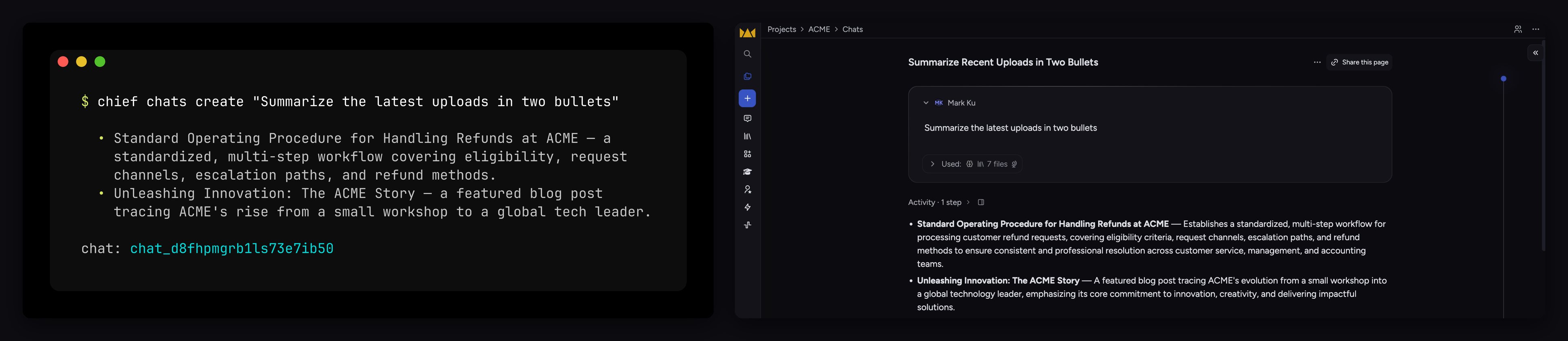
The same project, two ways in: drive it from your terminal (left), or work in the Chief app (right).
What you can do with it
Everything you do in the Chief app, you can now do from your own stack:- Ask your coding agent about your project. “What are the main themes across everything we’ve uploaded this quarter?” — answered from your Chief project, no code required. See Use Chief with your AI coding agent.
- Automate recurring work. Schedule an action that summarizes new assets every morning and emails your team the digest — see what you can build for more outcomes.
- Pull Chief into your own product. Start a chat over your project’s knowledge from your backend and stream the answer into your app over REST.
- Drive Chief from scripts and CI. Bulk-upload a directory of documents, then list and
triage them — straight from your shell with the
chiefCLI. - Have an agent build the integration. Hand Claude Code your API token and this reference, and ask it to write the script that does the job. It reads the docs and builds it.
Three ways to build
The MCP server and the REST API are two peers for building on Chief — connect an agent over MCP, or call the API directly from any language. The CLI is the tool for the shell and CI.MCP server
Give Claude Code, Cursor, or Codex direct access to your project. No SDK, no curl.
REST API
Build directly against the API from any language. Every endpoint, with an interactive
playground.
CLI
The
chief command for your shell, scripts, and CI — styled output or JSON.Get started
What you can build
Five concrete outcomes you can ship on Chief — and the shortest path to each.
Use Chief with your AI coding agent
New here? Connect your agent and ask your first question in minutes — no curl required.
Quickstart
Zero to a chat response with plain
curl.Tools overview
The Go SDK, the
chief CLI, and the MCP server, side by side.API reference
Authentication, errors, pagination, and every endpoint.